
Executive Summary
SiteSage is an open-source AI-driven location analytics and strategy agent built with Railtracks designed to help cafes make data-informed decisions about physical store placement, market potential, and network optimization. By combining advanced geospatial analytics, foot-traffic insights, and retail performance indicators into a unified, transparent agentic workflow, SiteSage enables teams to rapidly evaluate potential sites, compare trade areas, and forecast performance all with minimal manual effort.
Architecture
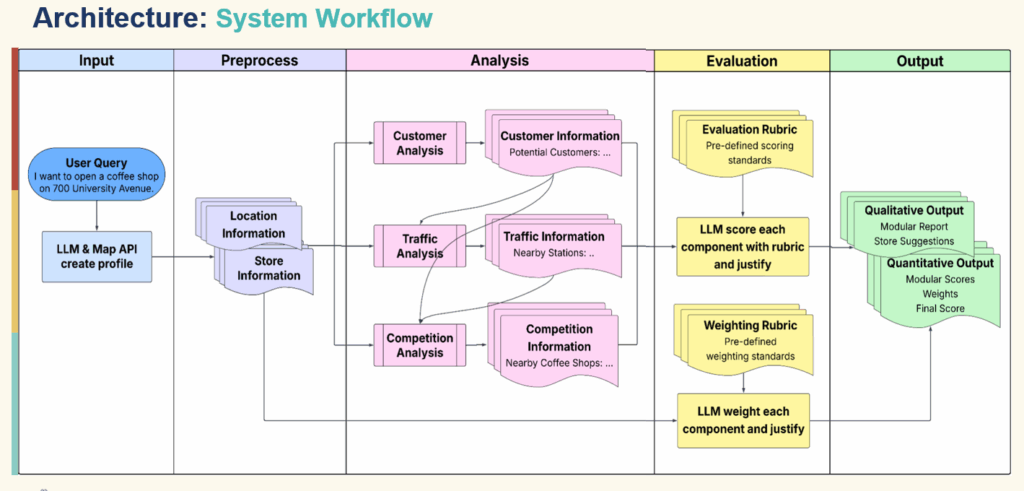
The agent’s frontend is built with a simple and intuitive web user interface for entering location description and viewing results. This allows the users a frictionless way to input prompt and receive a clear, structured analysis.
The pipeline is a sequence of specialized agents including the following: understanding, customer, traffic, competition, weighting, evaluation and final reporting. The agent utilizes reusable Python tools for geocoding and map visualization, nearby place search, population and age composition, web search, population and static map image understanding. The agent also utilizes multiple data sources such as map APIs, population datasets, web search APIs, and public review counts to help generate the final report.
Each tool has a system prompt describing its role, has access to a subset of tools, receives structured input (such as store info, location and previous reports), and produces a structured markdown report or JSON result as the agent sits on top of each tool.
Railtracks is the critical layer that connects Python tools, LLM calls and the state and logging for each step.
Design
Single prompt, single agent with internal phases and multi-agent design were considered in building the agent.
Single prompt
One giant prompt with everything – “Here’s the store, the location, all the raw data; please analyze customers, traffic, competition, weight them, score them, and summarize.”
Single agent with internal “phases”
One agent, one system prompt, but we guide it through multiple back‑and‑forth turns (analysis, weighting, evaluation, summary) sharing a common context window.
Multi‑agent pipeline
Distinct agents with clear roles, separate system prompts, and explicit hand‑off between them. This design made the most sense as SiteSage is being built.
The first two designs were evaluated but rejected as issues arise. The single prompt designed revealed itself to have hard-to-control prompts, mixed responsiblities (analysis+ judgment + writing), resulted to 53% accuracy on the ranking task. The single agent presented issues like misidentifying demographic profile affecting later stages with only 47% accuracy on the ranking task.
Multi-agent Design
Having separate agents allowed SiteSage to have short, focused prompts, modularity, better evaluation and future parallelism resulting to 79% ranking accuracy.
With short, focused prompt, each agent is targeted – he customer agent gets to focus about demographic and customer source, the traffic agent focuses on access and flows, but can read the Customer report as the competition agent focuses on competitor landscape, with access to both Customer and Traffic reports
This model allows modularity by enabling prompts or tools to swap without affecting other elements and upgrade one piece in isolation
Multi-agent design allows customer report to be inspected for correctness separate from traffic analysis and verify whether score disagreements are rooted in data, weighting, or rubric design
A straightforward run customer/traffic/competition agents in parallel while allowing caching and tool reuse output across agents
Pipeline Walkthrough
This is SiteSage’s core orchestration function simplified
					async def run_sitesage_session_async(
    session_id: str,
    prompt: str,
    *,
    language: str = "en",
    region: str = "global",
) -> Dict[str, Any]:
    # 1) Understanding Agent - extract store info & geocode
    understanding_agent = make_understanding_agent()
    understanding_prompt = get_understanding_prompt(prompt)

    with rt.Session(logging_setting="INFO", timeout=600.0):
        resp = await rt.call(understanding_agent, user_input=understanding_prompt)

    ujson = parse_json_from_text(resp.text)
    store_info = dict(ujson.get("store_info", {}))
    location_info = extract_location_info(ujson.get("place", {}))

    # 2) Customer Agent
    customer_agent = make_customer_agent()
    customer_prompt = get_customer_prompt(store_info, location_info)

    with rt.Session(logging_setting="INFO", timeout=600.0):
        cresp = await rt.call(customer_agent, user_input=customer_prompt)

    customer_report = cresp.text.strip()
    customer_context = summarize_report(customer_report, "customer")

    # 3) Traffic Agent (has access to customer context)
    traffic_agent = make_traffic_agent()
    traffic_prompt = get_traffic_prompt(store_info, location_info, customer_context)

    with rt.Session(logging_setting="INFO", timeout=600.0):
        tresp = await rt.call(traffic_agent, user_input=traffic_prompt)

    traffic_report = tresp.text.strip()
    traffic_context = summarize_report(traffic_report, "traffic")

    # 4) Competition Agent (has access to both)
    competition_agent = make_competition_agent()
    competition_prompt = get_competition_prompt(
        store_info, location_info, customer_context, traffic_context
    )

    with rt.Session(logging_setting="INFO", timeout=600.0):
        kresp = await rt.call(competition_agent, user_input=competition_prompt)

    competition_report = kresp.text.strip()

    # 5) Weighting Agent
    weighting_prompt = get_weighting_prompt(store_info)
    weighting_response_text = run_weighting_agent(weighting_prompt)
    wjson = parse_json_from_text(weighting_response_text)
    weights = normalize_weights(wjson.get("weights", {}))

    # 6) Evaluation Agent (rubric-based scoring)
    ejson = run_evaluation_agent(
        customer_report,
        traffic_report,
        competition_report,
        customer_rubric,
        traffic_rubric,
        competition_rubric,
    )

    # Compute final weighted score
    final_score = (
        weights["customer"] * ejson["customer"]["score"]
        + weights["traffic"] * ejson["traffic"]["score"]
        + weights["competition"] * ejson["competition"]["score"]
    )

    # 7) Final Report Agent
    final_agent = make_final_report_agent()
    final_prompt = get_final_report_prompt(
        session_id,
        prompt,
        store_info,
        location_info,
        customer_report,
        traffic_report,
        competition_report,
        ejson,
        weights,
        final_score,
    )

    with rt.Session(logging_setting="INFO", timeout=600.0):
        fresp = await rt.call(final_agent, user_input=final_prompt)

    fjson = parse_json_from_text(fresp.text)

    return {
        "session_id": session_id,
        "store_info": store_info,
        "place": location_info,
        "reports": {
            "customer": customer_report,
            "traffic": traffic_report,
            "competition": competition_report,
        },
        "scores": {
            "customer": ejson["customer"]["score"],
            "traffic": ejson["traffic"]["score"],
            "competition": ejson["competition"]["score"],
        },
        "weights": weights,
        "final_score": final_score,
        "final_report": fjson,
        # ... additional metadata
    }
A few things to note:
Each agent call is wrapped in
rt.SessionThis gives us:
- Timeouts
- Logging
- Access to Railtracks’ local visualization tools
The orchestrator is just Python
No YAML, no separate workflow DSL. Data flows are explicit.
We summarize each report before passing it on
summarize_reportuses a cheaper model to create short summaries from the detailed markdown, which keeps the context lean for downstream agents.
Rubric‑Based Scoring: Making AI Judgments Comparable
One of the hardest parts of building decision‑support systems with LLMs is consistency.
You want:
- If you re‑run the system on the same location tomorrow, scores should be similar.
- If you compare two locations, the results should be stable and interpretable.
- If you change a small detail (e.g., business type), you want controlled changes in scoring, not chaos.
Free‑form “give a score from 1–10” prompts are notoriously flaky. Our solution: explicit rubrics.
Why rubrics?
Structure
Rubrics define:
- Criteria (e.g., “Density of target customers within walking distance”)
- Scales (“0 = no clear customer base; 10 = extremely strong and well‑matched customer base”)
- Examples for high, medium, low
Interpretability
When we read scoring outputs, we see the LLM justifying scores by referencing rubric language.
Debuggability
If scores don’t line up with expectations, we can:
- Inspect which rubric dimension was mis‑applied
- Adjust rubric wording without touching other parts of the system
How we use them
We maintain separate rubrics for:
- Customer dimension
- Traffic dimension
- Competition dimension
The Evaluation Agent receives:
- The three analysis reports (customer/traffic/competition)
- The corresponding rubrics
It’s then instructed to:
- Score each dimension on a 0–10 scale
- Justify each score with reference to the rubric
- Output a structured JSON with:
scorereasoning- (optionally) sub‑scores
The Weighting Agent, distinct from Evaluation, focuses on business priorities:
- For a quick‑service takeaway store:
- Weight traffic higher
- Weight competition lower (because strong traffic can offset competition)
- For a destination restaurant:
- Weight competition and uniqueness more heavily
Separating “quality of location along each factor” from “importance of each factor for this business” helps avoid:
- Circular reasoning (“traffic looks good because I want it to be important”)
- Conflated concepts
Aggregation
Once we have:
scores = {customer: c, traffic: t, competition: k}
weights = {customer: wc, traffic: wt, competition: wk}
We compute:
final_score = wc * c + wt * t + wk * k
And pass that, plus the factor‑wise explanations and weights, into the Final Report Agent, which:
- Explains the score breakdown
- Makes a recommendation
- Surfaces major pros and cons
This rubric structure is a big reason why SiteSage produces stable, comparable scores — a prerequisite for our ranking evaluation.
Tool Layer Design + Railtracks @function_node
Underneath the agents lies a set of Python tools that interface with:
- Map providers
- Population datasets
- Web search
- Vision models
Conceptually, each tool is just a function:
					def get_population_stats(location: Mapping[str, Any] | str, radius: float = 500.0) -> Mapping[str, Any]:
    ...
The challenge without a framework
In raw OpenAI or other SDKs, turning this into an LLM‑callable tool means:
- Manually writing a JSON schema describing:
- Parameter names
- Types
- Descriptions
- Handling the function calling protocol:
- Parsing the model’s tool call response
- Converting JSON arguments into Python types
- Validating arguments
- Keeping the schema in sync with the function signature
This is both tedious and brittle.
Railtracks’ @function_node solution
Railtracks’ core design is tool‑first. Any function can be turned into a tool with:
					@rt.function_node
def tool_get_population_stats(
    location: Mapping[str, Any] | str,
    *,
    radius: float = 500.0,
    coord_ref: str = "WGS84",
) -> Mapping[str, Any]:
    """
    Summarize population counts and age composition within a radius around
    a latitude/longitude point using population rasters.

    Args:
        location: Dict with 'lat'/'lng', dict with 'address', or an address string.
        radius: Search radius in meters. Default: 500.
        coord_ref: Coordinate system identifier (e.g. WGS84).
    """
    # Convert string addresses to coordinates if needed
    if isinstance(location, str):
        place_info = map_tool.getPlaceInfo(location)
        location = {"lat": place_info["lat"], "lng": place_info["lng"]}
    elif isinstance(location, dict) and "address" in location:
        place_info = map_tool.getPlaceInfo(location["address"])
        location = {"lat": place_info["lat"], "lng": place_info["lng"]}

    return demographics_tool.getPopulationStats(
        location,
        radius_m=radius,
        coord_ref=coord_ref,
    )
The decorator does the heavy lifting:
- Reads the signature (parameters, types, defaults)
- Reads the docstring
- Generates an LLM‑consumable tool specification (OpenAI‑style function calling, Anthropic, etc., depending on the provider)
- Handles argument parsing and validation on each call
From the agent’s perspective, using the tool is as simple as:
					customer_agent = rt.agent_node(
    name="CustomerAgent",
    tool_nodes=(tool_get_population_stats, tool_get_nearby_places, tool_web_search),
    system_message=rt.llm.SystemMessage(CUSTOMER_AGENT_SYSTEM),
    llm=rt.llm.OpenAILLM("gpt-5.1"),
    max_tool_calls=12,
)
Now the LLM can:
- See the tool with its description
- Decide when and how to call it
- Receive structured results
We use the same pattern for:
tool_get_nearby_places(place search with type projection; see below)tool_get_map_visualization(static map + optional vision analysis)tool_static_map_image_understand(vision call)tool_web_search(web search and snippet extraction)
Defensive coding for LLM weirdness
In practice, LLMs occasionally:
- Send single values instead of lists
- Wrap scalar arguments in small dicts
We accommodate this with small, local fixes inside tools. For example, in tool_get_nearby_places:
					@rt.function_node
def tool_get_nearby_places(
    origin: Mapping[str, Any] | str,
    descriptive_types: Sequence[str],
    *,
    radius: int = 500,
    rank: str = "DISTANCE",
    num_pages: int = 2,
) -> List[Mapping[str, Any]]:
    """
    Retrieve nearby places by projecting descriptive categories to
    provider-specific types.
    """
    # Allow dicts accidentally passed instead of lists
    if isinstance(descriptive_types, dict):
        descriptive_types = [
            v
            for vals in descriptive_types.values()
            for v in (vals if isinstance(vals, list) else [vals])
        ]

    if isinstance(rank, dict):
        rank = list(rank.values())[0]

    if isinstance(num_pages, dict):
        num_pages = list(num_pages.values())[0]

    nearby_places = map_tool.getNearbyPlaces(
        origin,
        descriptive_types,
        radius=radius,
        rank=rank,
        num_pages=num_pages,
    )

    # Filter out the exact origin itself
    nearby_places = [p for p in nearby_places if p.get("distance", 1) != 0]
    return nearby_places
By centralizing these robustness fixes inside tools, we keep agent prompts clean and focused on domain logic.
Try and Explore the SiteSage
Run SiteSage locally
					git clone <https://github.com/CoronRing/SiteSage>
cd SiteSage
pip install -e .

# Set your API keys in a .env file
# e.g. OPENAI_API_KEY=...

python src/sitesage_frontend.py
# Then open <http://127.0.0.1:8000> in your browser
What you’ll see:
- A simple web interface to enter your store idea and location
- An output section with:
- Customer, Traffic, Competition reports
- Scores and weights
- A final narrative summary
Get inspired by more agent demos



Build Smarter Agents Faster, Easier for Free
Download Railtracks from GitHub and get access to powerful agent orchestration tools that simplify complex agentic flows.
